Instructions
The spreadsheet is split up into several tabs, each with a different purpose. You can navigate between the tabs by clicking their names at the bottom of the spreadsheet.

Daily
This tab is to track your daily points usage. It will calculate how many points you have to spend and add up the points you have used.
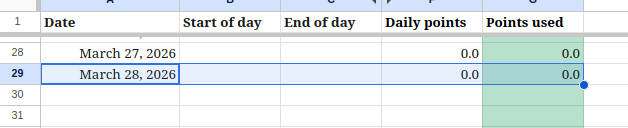
- You may need to duplicate the row for a new day. Highlight the row for yesterday from Date to Points Used. A circle will appear on the bottom right corner of the highlighted cells. Click and drag that circle down to duplicate the row as many times as you need to. Update the dates as necessary.
- At the start of your day, update Start of day with how much energy you feel you have on a scale of 1-10, with 1 being none and 10 being as much as you felt before. This will give you a number of points to spend for the day.
- At the end of the day, update End of day with how much energy you feel you have at the end of the day on a scale of 1-10, with 1 being none and 10 being as much as you have ever felt.
Active
This tab is to track your activities throughout the day. It will calculate how many points each activity you do costs and contribute to the points used during the day.

- You may need to duplicate the row for a new day. Highlight the last row of data from Date to Notes. A circle will appear on the bottom right corner of the highlighted cells. Click and drag that circle down to duplicate the row as many times as you need to. Update the dates as necessary.
- For each activity, set your Date, Task, and Duration (Minutes) of activity in minutes.
- You can optionally set Headache as True if you had or developed one or False if not.
- If you are tracking your heart rate, update High heart rate with what the highest heart rate you saw for yourself during the activity.
- The Points column will update with how many points that activity took. The Daily sheet will also update with how many points you have spent for the day.
Blood pressure
This tab can help you keep track of your blood pressure over time. Individual results are not an indication of a health condition. If you see anything in your blood pressure figures that cause concern, please contact your doctor.
- When you take your blood pressure, record on the sheet.
- The cells will update with colors to indicate whether it is average, high, or low.
- Blue – Low
- Green – In range
- Yellow – Elevated
- Orange – High
- Red – Very high
Standing tests
This tab is for tracking results of a Standing test. Individual results may imply the presence of POTS or other health issues. If you see a trend towards POTS, please contact your doctor.
- Follow the instructions for a Standing Test or the NASA Lean Test.
- When you conduct a standing test, record on the sheet.
- The last column will calculate the difference in beats per minute across the test. If the difference is greater than 30bpm, the column will highlight in red. Individual cells above 120 will also highlight in red.
Reference
This tab has the list of tasks and points allocated to the tasks. If you want to add tasks, add them to this sheet and they will appear on the Active tab.
- Choose your Category (Cognitive, Physical, Social).
- Give your task a name.
- Determine how long you might do the task and how many points the task would cost.
Settings
If you are watching your heart rate as part of your tracking, this tab allows you to set your max heart rate.
- Update with your age and percentage preference for heart rate settings.
Updates
-
One thing finished!
I am happy to announce that I made it through February without any major crashes, or even minor ones, as a result of working on projects! This means that I can increase my time on projects every day from 20…
-
I made an activity tracker
In case you missed it somehow, I’ve had long covid since 2022. Among the many health issues this caused was chronic fatigue that came with something called post exertional malaise, or PEM. PEM was the absolute worst because it meant…
-
New month, more time!
Because I made it through January without crashing I get an extra five minutes a day to work on things! Up from 15 minutes to 20! I am, unfortunately, not able to do that consecutively yet, so I’m doing two…